Branded quotes and invoices
Create professional quotes and invoices with your logo, customer details, line items, VAT fields, payment terms, and your bank details on the invoice.
R0/month invoicing for South African businesses
Send quotes and invoices. Accept card payments once your payment account is active.
Quotes before it, payments and statements after it, and the expenses and bank lines your accountant needs at month-end.
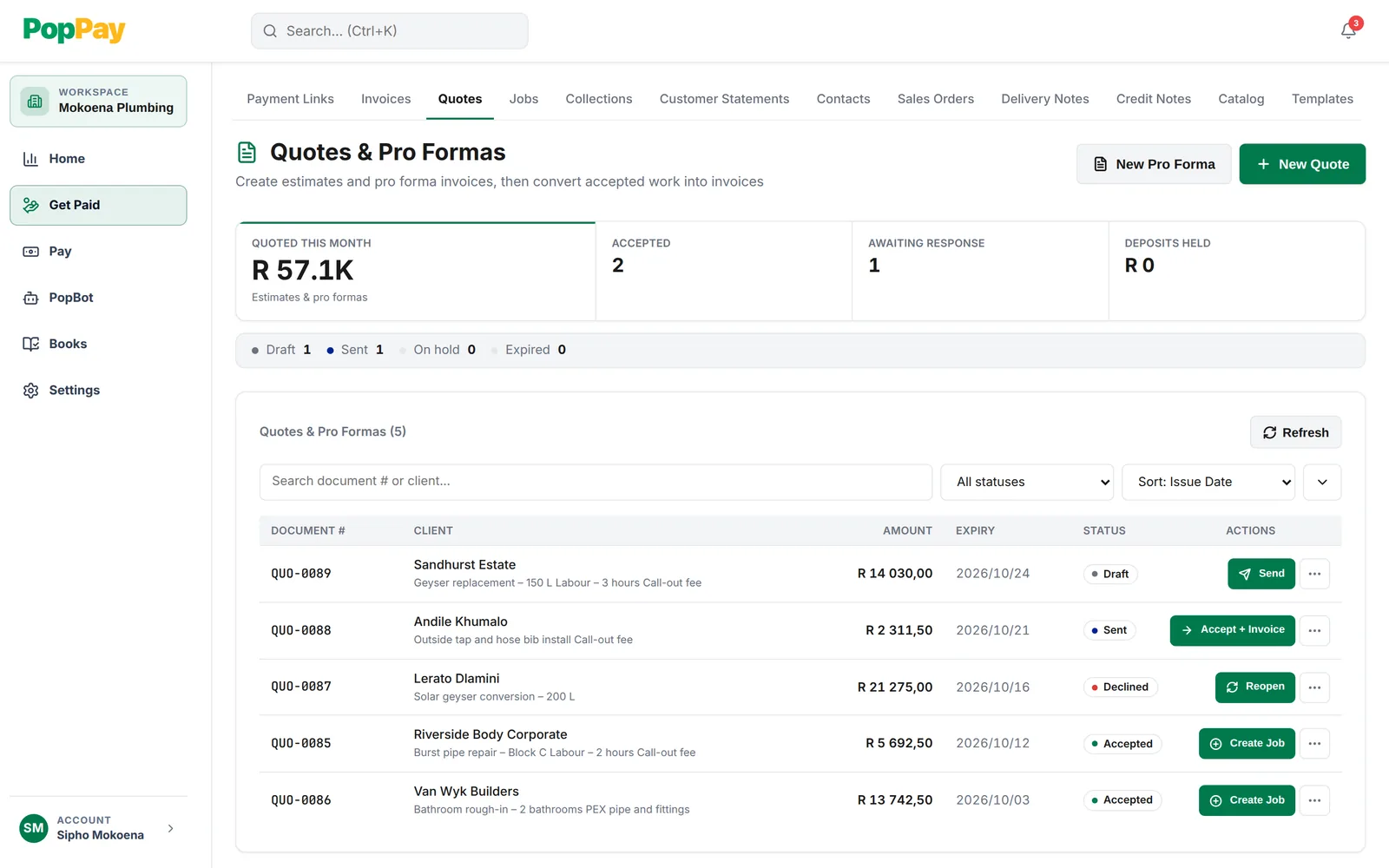
Send a quote by email, or copy its link into your own WhatsApp. When the customer accepts, Accept + Invoice turns it into an invoice without retyping a line.
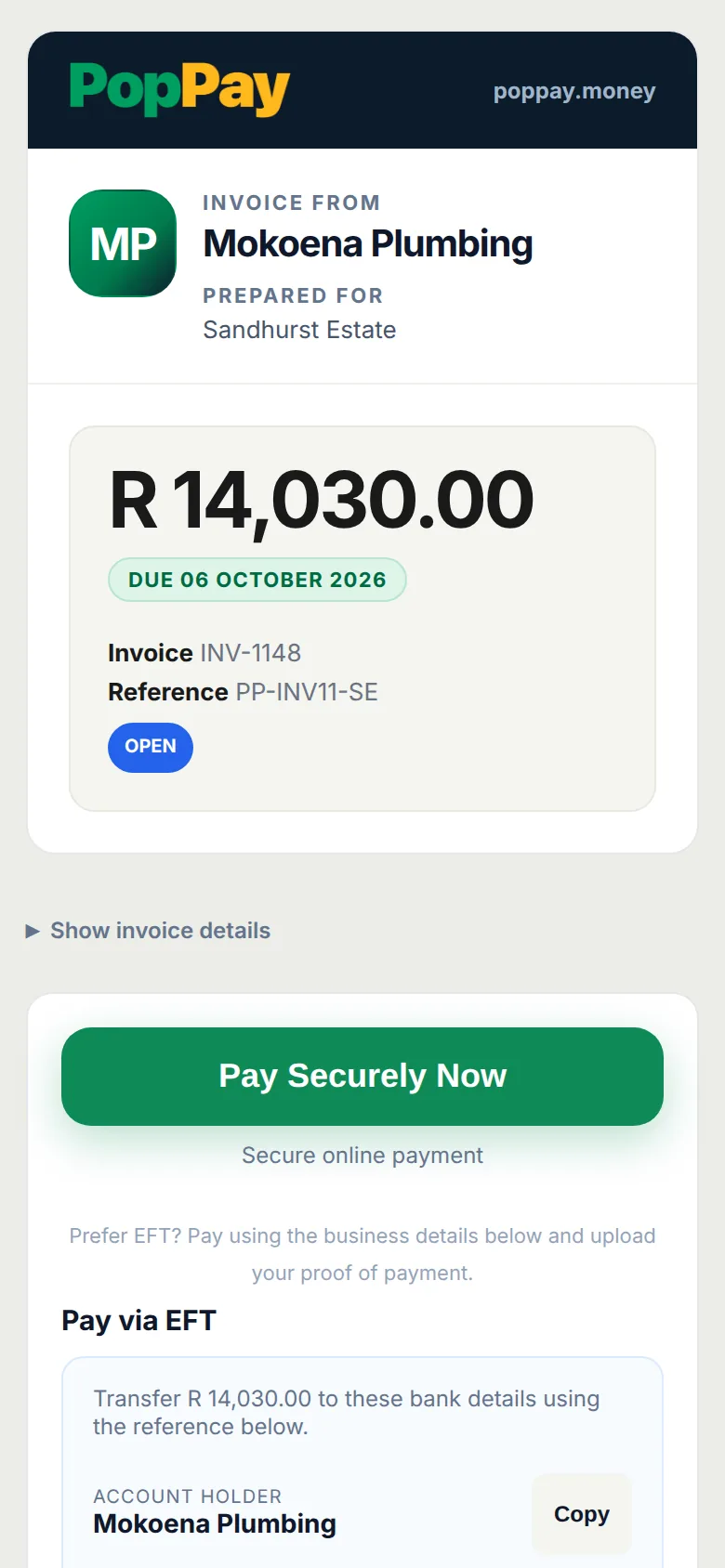
Once your payment account is active, the invoice email and payment page show a Pay Securely Now button. Customers who prefer EFT still have your bank details on the invoice.
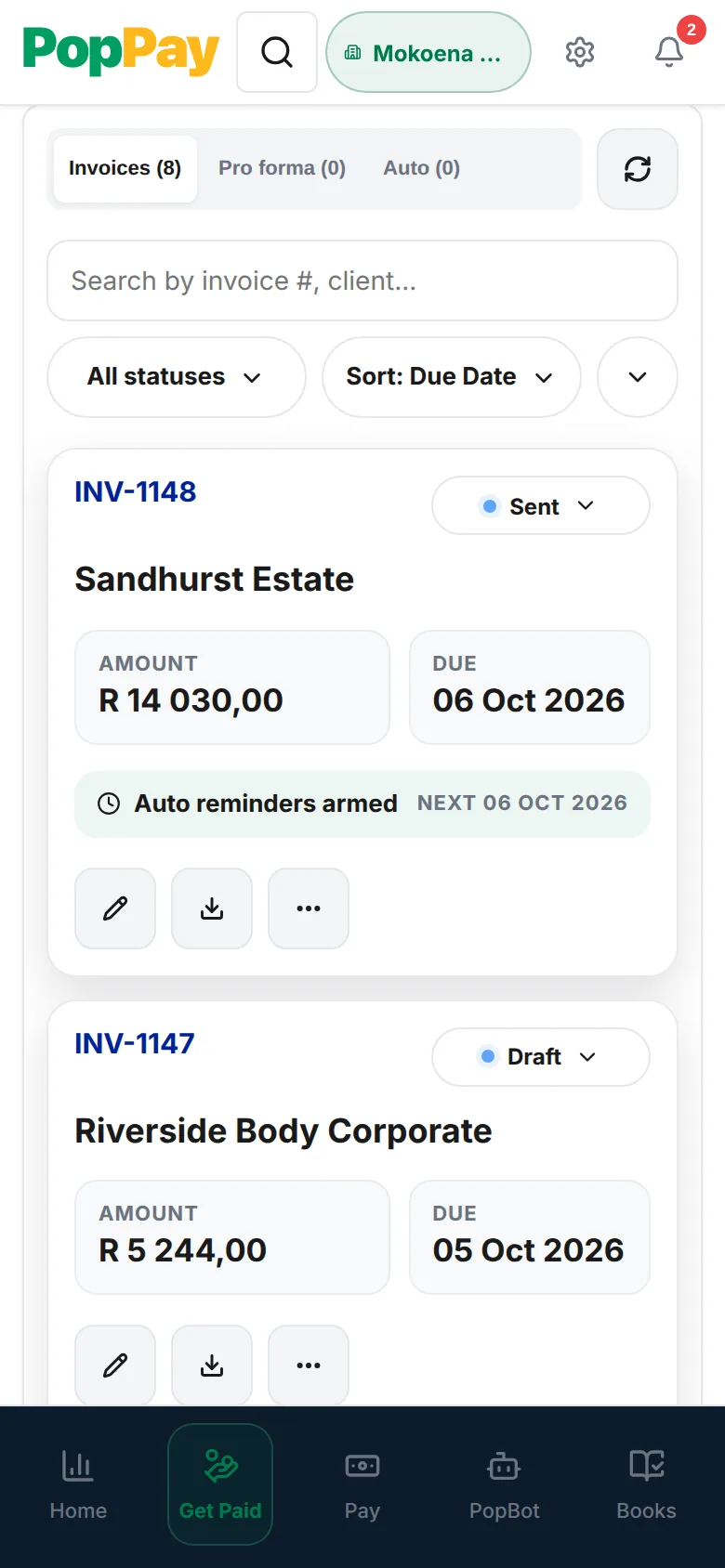
Card payments mark the invoice paid. Overdue invoices get reminder emails on a set schedule, and the reminders stop once the invoice is paid.
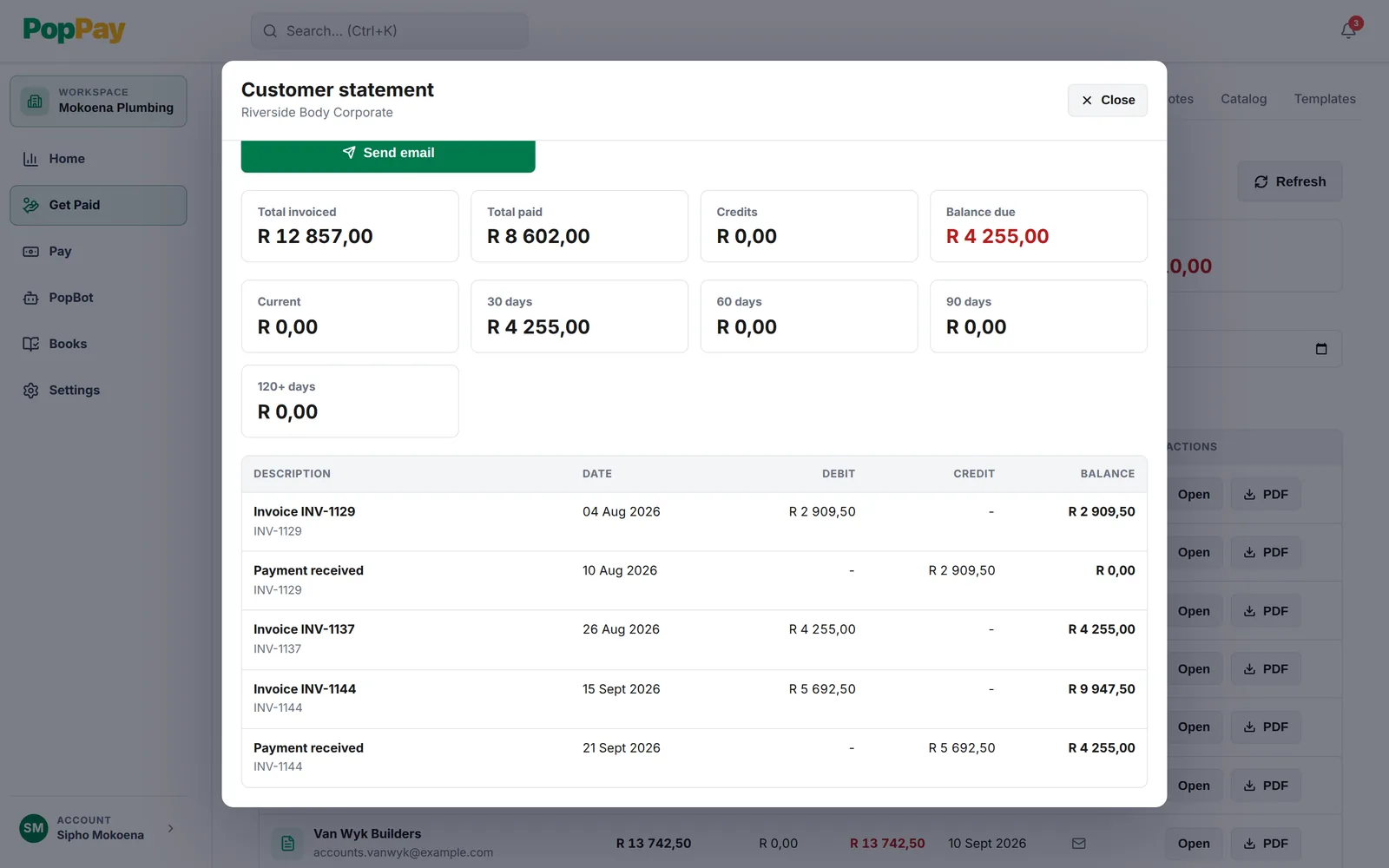
Pick a date range and PopPay lists every invoice and payment with a running balance and how long it’s been owing. Email it, download the PDF, or copy a statement page link.
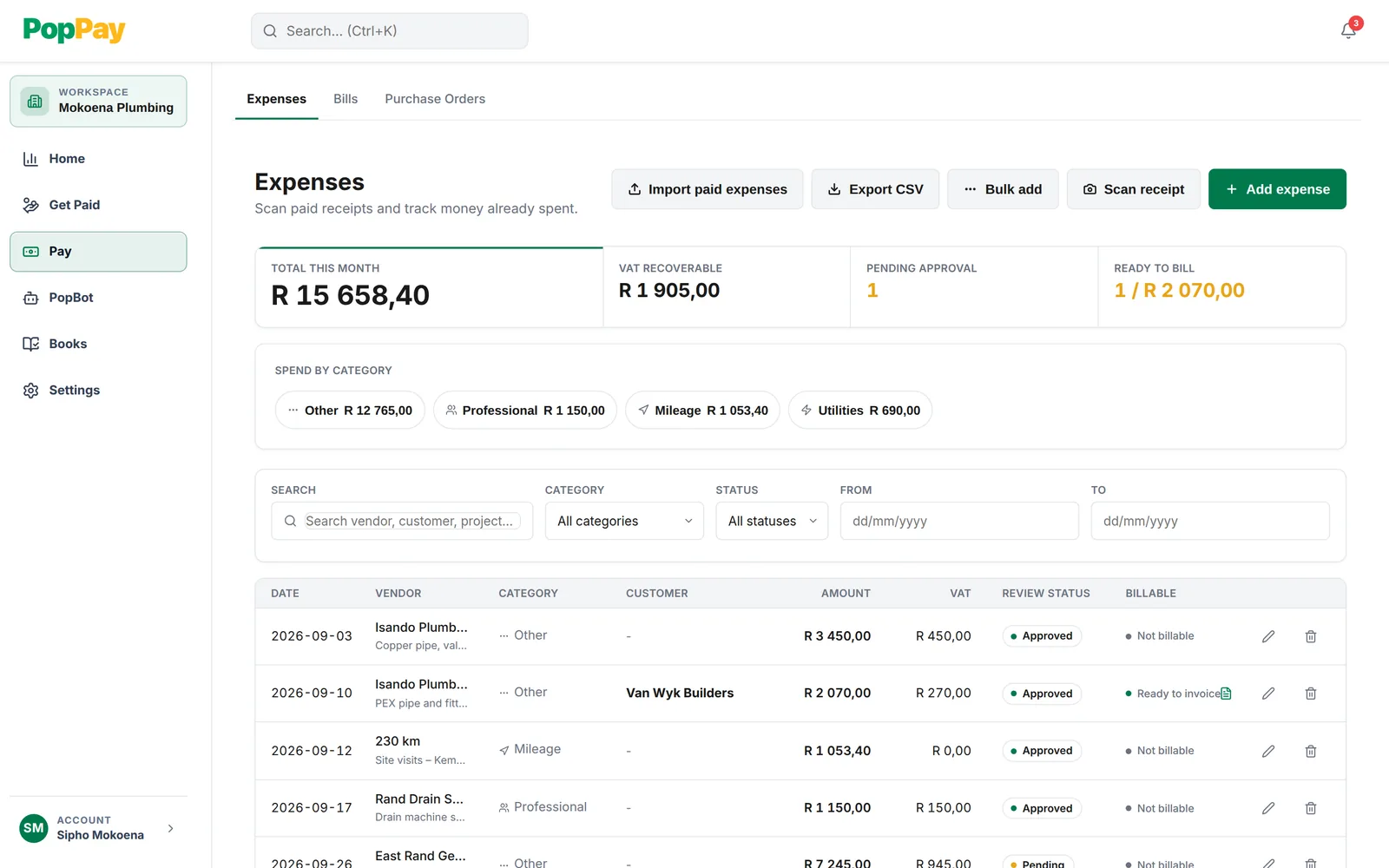
PopPay reads the supplier, amount and date off a receipt photo for you to check. Log site trips as mileage, and mark a cost billable to a customer to invoice them for it.
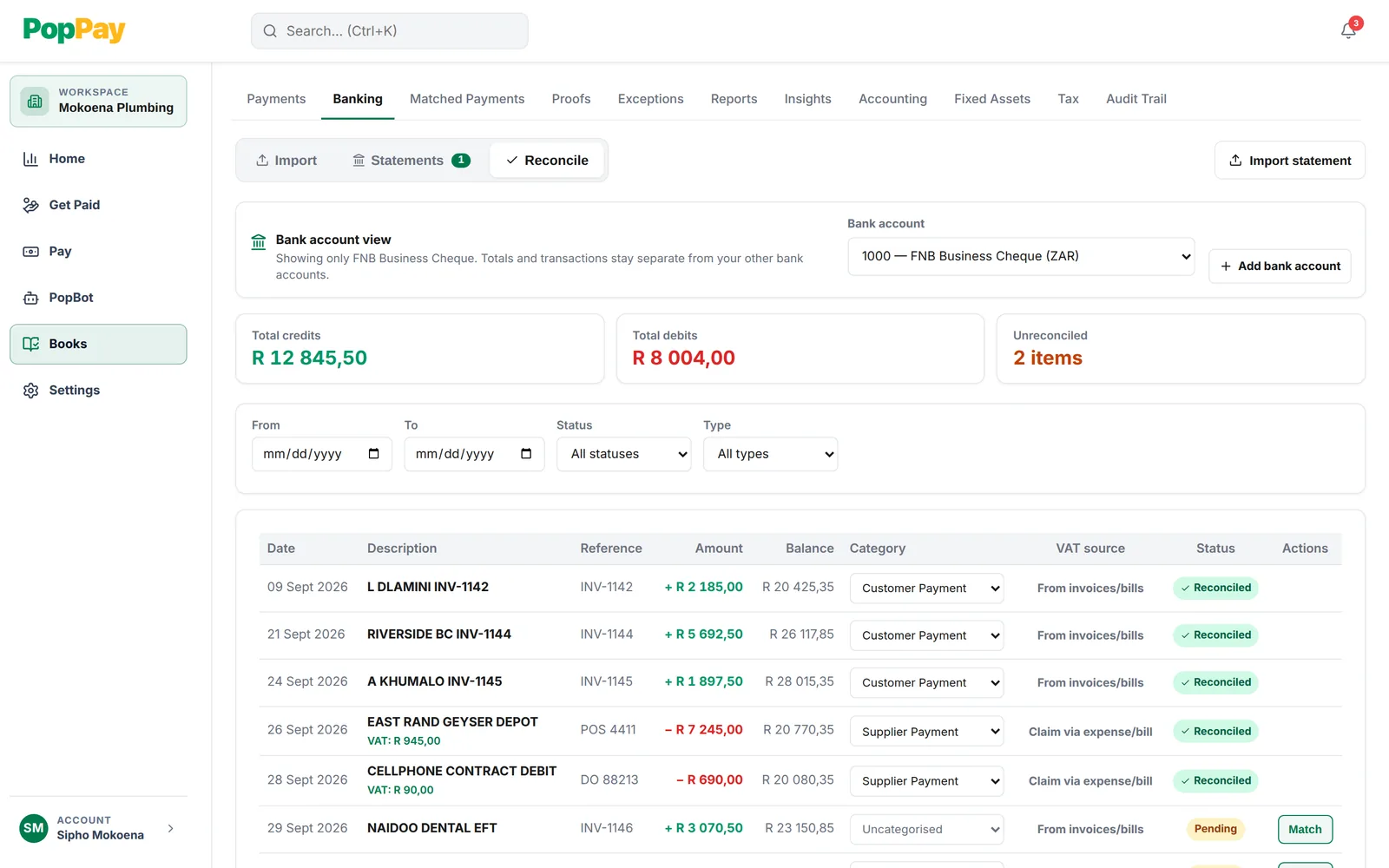
Import your bank statement as a CSV or PDF, then match each deposit to an invoice and each debit to an expense. The Unreconciled count shows what’s left before month-end.
Quote → book → invoice → paid. Every step lives in the same place, with the same customer record. Customers can pay by card from the invoice. South African cards 3% + R2, before VAT. Manual EFT to your bank details stays free.
Please review the attached tax invoice. Bank details are on the invoice. Customers can pay by card from the invoice.
Supplier invoices are scattered across email, PDFs and your banking app. PopPay turns the mess into one payables list: what's due, what's paid, and where the receipt is.
Quotes, invoices, payments and bills are linked where possible and queued for review. Your accountant gets a tidy evidence pack at month-end.
Your accountant still gets the final say. PopPay keeps the records and evidence they review.
What happens, in order, so nothing catches you off guard.
Your name, email, business name and a password. We email you a 6-digit code to confirm your address.
They appear on your quotes and invoices, so customers know exactly where to pay you by EFT.
Our payments partner checks who owns the business, so payments reach the right account.
Have these ready
Send quotes and invoices with your EFT details as soon as you submit. After approval, usually within 1 business day, Pay now switches on and customers see a Pay Securely Now button.
At R2,000 in qualifying Payment Links earnings, Cross-Switch starts full verification, usually taking 1–2 business days. Cross-Switch holds your first payout until verification and release are confirmed. After release, payouts run daily on business days.
Submitting your application doesn’t switch on Pay now. We email you when Cross-Switch approves your business and online payments are ready.
PopPay keeps quotes, invoices, EFT proofs, jobs, time, CSV statements, VAT fields, and accountant review exports in one practical workflow.
Create professional quotes and invoices with your logo, customer details, line items, VAT fields, payment terms, and your bank details on the invoice.
Suggest proof-of-payment matches to invoices and customers so likely paid work can pause chasing while the business reviews the evidence.
Track the job, the time, the quote, the invoice, the payment proof, and the customer history without rebuilding the story in a spreadsheet.
Import bank statement CSVs and review deposits against outstanding invoices, manual EFTs, and proof records before month end.
Keep SARS-aware invoice fields and export review packs your accountant can use when preparing your return.
South African cards 3% + R2, before VAT. International cards 3.5% + R2, plus FX, before VAT. Customers can still pay you by manual EFT for free.
Save your regular services, products, prices, descriptions, and VAT treatment so every quote or invoice starts with clean line items.
Keep customers, billing details, invoice history, payment status, and statement downloads together so follow-ups start from the full account picture.
Track money going out beside money coming in, attach supplier records, and give your accountant cleaner context when month end arrives.
Software is R0/month for South African SMEs, with no paid plans to upgrade to. PopPay fees apply only when a customer pays you by card.
Unlimited invoices, quotes, expenses and contacts. R0/month for South African SMEs.
South African cards 3% + R2, before VAT. International cards 3.5% + R2, plus FX, before VAT. The fee comes off the payout, so your customer pays the invoice amount.
When a customer pays with a card payment link, payment services are provided through PopPay's partnership with Cross Switch South Africa Technologies (Pty) Ltd. Cross Switch processes those transactions under its own terms. PopPay provides the software and reconciliation layer; it is not a bank or regulated financial institution and does not hold customer or merchant funds.
PopPay is where you quote, invoice and keep your records. EFT goes straight to your bank, and Cross-Switch looks after card payments and payouts.
Cross Switch South Africa Technologies (Pty) Ltd runs card checkout under its own terms. It holds your first payout until verification and release are confirmed, then pays out to the bank account you give it.
We don’t hold customer or merchant funds. When a customer pays by EFT, the money goes straight to the account on your invoice.
Connections run over HTTPS, and payment settings and account details are encrypted at rest. Two-factor login is one switch in Settings.
Our Privacy Policy and POPIA page set out what we collect, why we need it, and how to reach us about your information.
Yes. PopPay software is R0/month for South African SMEs, and there are no paid plans. Card payments have a fee: South African cards 3% + R2, before VAT. International cards 3.5% + R2, plus FX, before VAT. Manual EFT to the bank details on your invoice is free.
An email address to create your account. Then you add your business details and the bank account customers pay by EFT, and verify your business with Cross-Switch, our payments partner. Have the owner or director’s ID and a proof of address ready. Cross-Switch may also ask for proof of the bank account.
Yes. Once you submit your application, you can send quotes and invoices with your EFT details while Cross-Switch reviews it.
After Cross-Switch approves your business, usually within 1 business day of submitting. We email you when online payments are ready, and your invoices then show a Pay Securely Now button. Submitting the application doesn’t switch on Pay now by itself.
At R2,000 in qualifying Payment Links earnings, Cross-Switch starts full verification, usually taking 1–2 business days. Cross-Switch holds your first payout until verification and release are confirmed. After release, payouts run daily on business days.
You do. The fee comes off the payout, so your customer pays the amount on the invoice. Neither PopPay nor Cross-Switch adds a surcharge at checkout.
No. PopPay is software, not a bank, and does not hold customer or merchant funds. Cross Switch South Africa Technologies (Pty) Ltd processes card payments, holds your first payout until verification and release are confirmed, and pays out to your bank account. EFT payments go straight to your bank account.
You can share an invoice or quote link from your own WhatsApp. PopPay sends invoices and reminders by email. It doesn’t send WhatsApp or SMS messages for you.
Yes. Invoices carry VAT fields, and PopPay prepares VAT review estimates and supported VAT201 exports for your accountant to review.
Yes. Invite them from Team with the Accountant role, and they get their own login.
R0/month software for South African SMEs. No paid plans, and no card needed to sign up.
Sign up at R0/monthSetup asks for your business and bank details, then the owner or director’s ID and a proof of address for Cross-Switch.